
用Jquery做一个网页阅读百分比指示器

橙子2024-09-21 16:09
785 浏览
打赏
收藏
用Jquery做了一个网页阅读百分比指示器,让用户看到页面中阅读了多少内容,相应的就滚动了多远。一般用在网站页面的上沿,显示一条阅读棒。部分用户在你的网页中只停留几秒钟,当用户向下滚动查看内容时,阅读进度条增加了一些用户界面增强功能,有一种暗示用户读完文章的意思。一部分用户会 follow 进度条直到读完全文,就实现了我们的目的,尽可能留存用户,延长用户停
用Jquery做了一个网页阅读百分比指示器,让用户看到页面中阅读了多少内容,相应的就滚动了多远。一般用在网站页面的上沿,显示一条阅读棒。
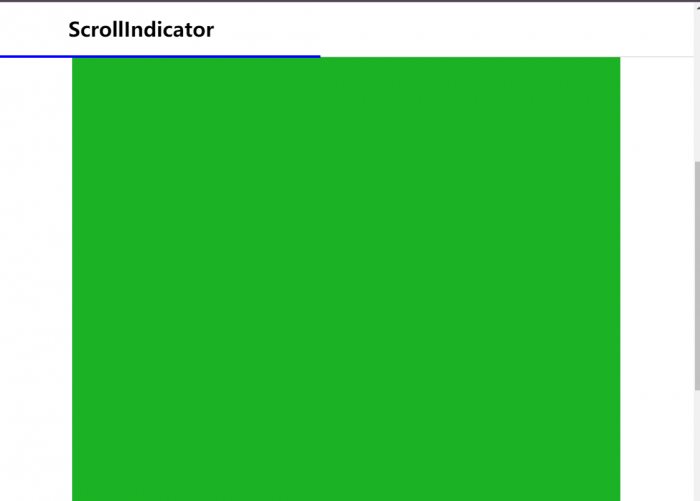
部分用户在你的网页中只停留几秒钟,当用户向下滚动查看内容时,阅读进度条增加了一些用户界面增强功能,有一种暗示用户读完文章的意思。一部分用户会 follow 进度条直到读完全文,就实现了我们的目的,尽可能留存用户,延长用户停留时间。
源文件:
<!DOCTYPE html>
<html>

<head>
        <meta charset="utf-8">
        <meta http-equiv="X-UA-Compatible" content="IE=edge">
        <title></title>
        <link rel="stylesheet" href="">
        <style type="text/css" media="screen">
        header {
                position: fixed;
                top: 0;
                left: 0;
                z-index: 1;
                width: 100%;
                background: #fff;
                border-bottom: 1px solid #ccc;
        }

        .header-proper {
                width: 80%;
                margin: 0 auto;
        }

        .scroll-line {
                height: 4px;
                margin-bottom: -2px;
                background: blue;
                width: 0%;
        }

        .content {
                padding: 100px 0;
                margin: 0 auto;
                width: 80%;
                height: 2000px;
                background-color: #1CB225;
        }

        .headline {
                font-size: 60px;
                line-height: 66px;
        }
        </style>
</head>

<body>
        <header>
                <div class="header-proper">
                        <h1 class="logo">ScrollIndicator</h1>
                </div>
                <div class="scroll-line"></div>
        </header>
        <div class="main">
                <div class="content">

                </div>
        </div>
</body>
<script src="http://libs.baidu.com/jquery/2.0.0/jquery.min.js"></script>
<script type="text/javascript">
$(window).scroll(function() {
        var wintop = $(window).scrollTop(),
                docheight =$(document).height(),
                winheight = $(window).height();
        var scrolled = (wintop / (docheight - winheight)) * 100;
        $('.scroll-line').css('width', (scrolled + '%'));
});
</script>
</html>



文章标题:用Jquery做一个网页阅读百分比指示器
文章链接:https://www.kmbk.cn/Web/102.html
所有文章未经授权禁止转载、摘编、复制或建立镜像,违规转载法律必究。
本站部分内容来源于网络,仅供大家学习与参考,如有侵权,请联系站长邮箱:906080088@qq.com进行处理。

扩展阅读






文章评论